The Best Apps & Tools I Use to Plan a Trip
My go-to travel tools for finding flights, booking stays, discovering places and turning all that research into a trip I’m actually excited about.
The Best Apps & Tools I Use to Plan a Trip
Planning a trip usually starts long before you arrive at the airport. I spend quite a bit of time researching flights, finding somewhere to stay, saving places I want to visit and looking for things to do. Over time, I’ve found a handful of apps and websites that make the process much easier and I tend to use each one for a different part of the planning.
These are the travel planning tools I actually use, from the first flight search to the final list of places I want to visit.
Affiliate disclosure: Some links in this article are affiliate links, which means I may earn a commission if you book or purchase through them, at no extra cost to you. I only recommend tools and services that I use or would genuinely consider using myself.
My favourite travel planning tools at a glance
- Skyscanner & Google Flights : finding and comparing flights
- Booking.com : finding and booking accommodation
- Google Maps : researching destinations, saving places and planning my itinerary
- Social media : discovering restaurants, cafés, hidden gems and travel inspiration
- Klook, GetYourGuide & Viator : finding tours, activities and experiences
You don’t need all of them for every trip. I simply use whichever ones are useful at each stage of planning.
Skyscanner & Google Flights : my go-to flight search tools
Best for: finding, comparing and monitoring flights
Skyscanner is usually where I start when looking for flights. I use it to explore different dates, destinations and nearby airports, and I like features such as Whole Month, Everywhere and price alerts when I have some flexibility.
I then use Google Flights as a second check to compare dates and prices and get a better idea of whether the fare I’m seeing looks reasonable.
I find the two work well together: Skyscanner is great for discovering options, while Google Flights helps me compare them before I book.
For a more detailed look at how I use these tools and my other flight-search tips, read The Best Flight Search Tools.
Booking.com : finding somewhere to stay
Best for: researching hotels and accommodation
Once I’ve decided where I’m going, Booking.com is usually my first choice for finding somewhere to stay and probably my favourite booking platform for hotels. I like being able to compare different areas, prices, reviews and hotel options in one place. Free cancellation is also something I look for when booking well in advance.
My approach is not necessarily to book the first hotel that looks good. I’ll usually start researching several months before a trip, keep an eye on prices and compare my options before settling on somewhere.
If your trip is still months away, flexible or free-cancellation bookings can be particularly useful. They give you the option to secure somewhere you like while continuing to monitor prices and availability.
Google Maps : one of my most useful planning tools
Best for: researching destinations, saving places and organising your trip
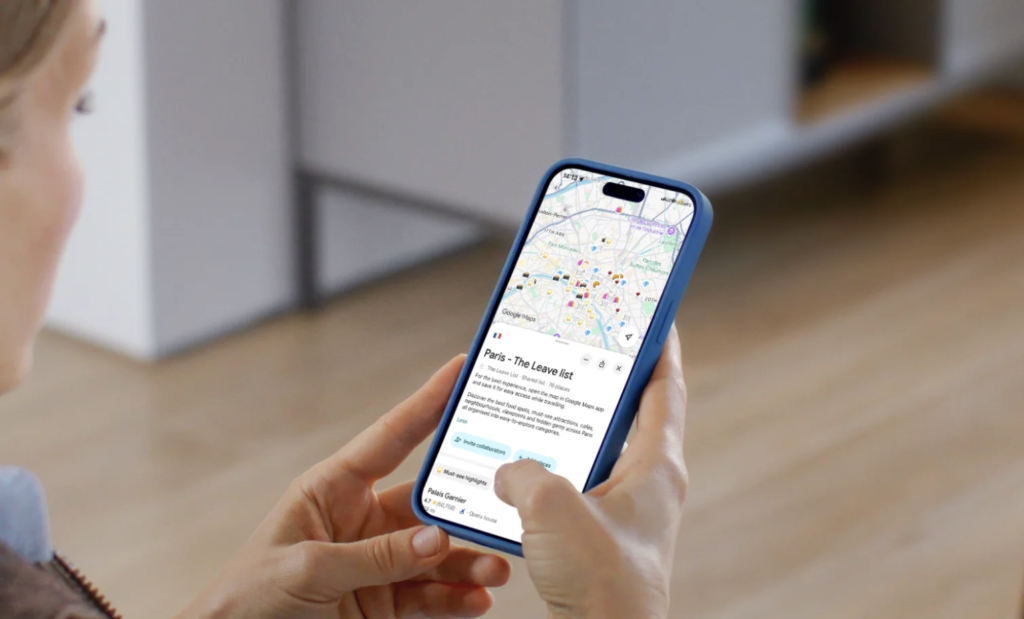
I genuinely don’t know how I travelled before Google Maps. I use it to find restaurants, cafés, shops, supermarkets, attractions and pretty much anything else I might need while I’m away. During the planning stage, I’ll save places that catch my attention and start getting a feel for where everything is located.
My favourite thing about Google Maps is that everything is in one place. You can see where you are, what’s around you, reviews, opening hours and how long it will take to get somewhere. When you’re planning a trip, being able to see where everything is on the map makes it much easier to work out which places make sense to visit together.
It’s also one of the reasons I created the The Leave List Maps. I already use Google Maps so much when I travel, so having all my carefully researched places saved in one place makes perfect sense.
And one tip I always recommend: download your destination’s offline map before you leave. You never know when your signal is going to disappear.
Klook, GetYourGuide & Viator : finding things to do
Best for: discovering and comparing tours, activities, tickets and experiences
Once I know where I’m going, I’ll check Klook, GetYourGuide and Viator to see what’s available. They overlap quite a bit, but I find that each can be useful for slightly different types of trips and experiences.
Klook is one I particularly like for Asia, especially when I’m looking for attraction tickets, activities, day trips or transport-related options. It can be particularly useful for destinations such as Japan, South Korea, Singapore and Southeast Asia, where it has a strong selection of local experiences and tickets.
GetYourGuide is one I tend to check for European city breaks, particularly for sightseeing tours, attraction tickets, guided experiences and day trips. It’s also useful when I’m looking for something easy to book in advance, with the exact meeting point, duration, inclusions and cancellation conditions clearly laid out on the activity page.
Viator is another one I check when I want to compare a wider range of tours and experiences. Its large catalogue means it’s often worth checking if I’m looking for something specific or can’t find quite what I want elsewhere.
There can be quite a lot of overlap between the three, and sometimes you’ll find the same or a very similar experience on more than one platform. That’s why I like comparing the itinerary, reviews, price, duration, what’s included and cancellation policy before booking.
I don’t necessarily use all three for every trip. I simply check the ones that make the most sense for the destination and the type of experience I’m looking for.
My tip: If an activity looks particularly good, don’t automatically book the first listing you find. Check the other platforms and, where relevant, the operator’s own website too. You may find a different price, availability or cancellation policy.
Social media : where I find a lot of my travel inspiration
Best for: discovering places you might not find through traditional travel guides
Some of my travel research doesn’t happen on a travel website at all. I use social media to discover restaurants, cafés, neighbourhoods, hidden gems, things to do and places that catch my attention.
Instagram and TikTok can be particularly useful when I’m looking for real-world inspiration and want to see what a place actually looks like rather than simply reading a description.
But I don’t take every recommendation I see online at face value. If I find somewhere I like, I’ll usually check it on Google Maps, look at recent reviews, check the location and make sure it actually makes sense for my trip before saving it.
For me, social media is the inspiration stage. Google Maps is where I do more of the checking and organising.
How I actually use these tools together
I don’t open seven different apps and plan my entire trip in one sitting. My planning usually looks more like this:
1. Find the flights
I’ll start with Skyscanner to explore different dates, airports and flight options. Then I’ll check Google Flights to compare the prices and make sure the fare looks reasonable.
2. Find somewhere to stay
Once I know my dates, I’ll use Booking.com to research different areas and accommodation options. If I’m booking well in advance, I prefer flexible options where possible so I have some room to change my plans later.
3. Start researching the destination
This is where social media and Google Maps come in. I’ll save restaurants, cafés, attractions, shops and other places that look interesting and gradually build up a list.
4. Look for things to do
I’ll check Klook, GetYourGuide and Viator to see which tours, activities and experiences are available. I’ll compare the options rather than assuming the first result is the best one.
5. Put everything together
Finally, I’ll look at everything I’ve saved on Google Maps and start thinking about how the different places fit together. This is where the trip starts to feel real and where I can work out what I actually have time for.
The tools I keep coming back to
In my opinion, you don’t need to use dozens of travel apps when planning a trip. For me, it’s less about finding the perfect travel app and more about knowing which tool to use for each part of the planning process.
Over time, I’ve found a handful of tools that fit naturally into the way I like to travel, and I tend to come back to the same ones for almost every trip. That’s pretty much all I need to go from having a vague idea of where I want to go to having a trip that actually starts to take shape.
Everyone will have their own way of planning, but this is the method I’ve found works best for me
And if you’re not a huge fan of spending hours researching like me, I’ve created The Leave List Maps to make that part of planning a little easier for you. They’re my own curated Google Maps with places I’ve already researched and saved, so you can spend less time searching and more time exploring.
Ready to turn your research into a trip?
Once I’ve found my flights, accommodation and places I want to visit, the next step is putting everything together into an itinerary that actually works.
If you’re wondering how far in advance you should plan and book a trip, I’ve also put together a guide covering when I usually start looking, booking flights and securing accommodation.
→ How Far in Advance Should You Book a Trip ?
And if you want the full approach I use to build an itinerary, I walk through how I turn all that research into a realistic trip without trying to cram too much into each day.
Find out more
Ready to plan the rest of your trip?
Explore practical tips to help you plan better, pack smarter and travel with ease.